Fields
In the Fields module you can allocate names to aspects to reflect terminology used in your organisation. Mandatory master- and hourly booking data entry requirements can also be set up here.
Aspect types
Go to Maintenance and settings | Fields. Here you can customise naming of aspects and set up user-defined fields.
The picture below show the default set up for the Customer aspect.
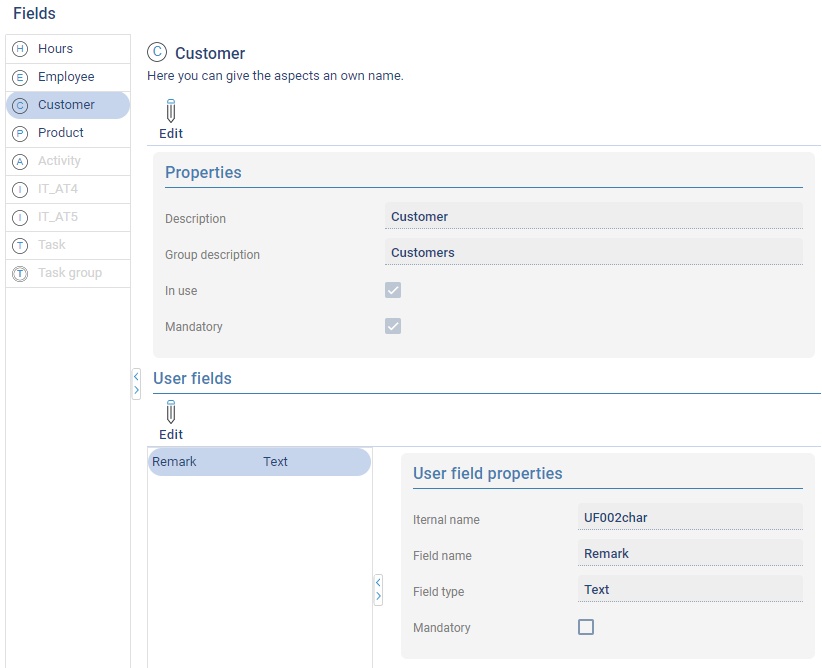
By clicking on  you can change the aspect types. You can set up the following properties for this:
| Description | The name of the aspect as used in your organisation. ** |
|---|---|
| Group description | Plural of the description, will be placed at the top of the lists. ** |
| In use | Use this to indicate if this aspect is to be used or not. |
| Mandatory | When this is ticked the selection of this aspect will be enforced when making hourly bookings. |
** In some cases the descriptions will only be effective after logging out and logging in again to TimeWriter (for example for report descriptions and report field names).
User-Defined Fields
At Maintenance and settings | Fields you can set whether or not user fields are mandatory. User fields are extra data that can be saved with master data or hourly booking. In TimeWriter Freeware 1 fixed user field (Remark) is available per aspect and 2 user fields (Activities and Number) per hourly booking. In TimeWriter Freeware you can only set whether or not the fields are mandatory, in TimeWriter Standard and Professional the setting options are more extensive.