Week grid
In Maintenance and settings | Settings | Week grid you can change Week grid settings. This screen contains two tabs; General and View.
General
On this tab you can set the following:
Times:
| Week starts on | Starting day of the week. Default setting is Monday. This can be changed to Sunday if necessary. This setting only affects the Week grid and the Fixed hours list. Reporting reflects the ISO standard that has Monday as its weekly starting date. |
|---|---|
| Work week starts on | The first day of the work week. ** |
| Work week ends on | The last day of the work week. ** |
| Working day starts at | Starting time of a working day. ** |
| Working day ends at | End time of a working day. ** |
| Lunch break starts at | Start time of lunch break. |
| Lunch break end at | End time of lunch break. |
| Minimal time unit | Minimal time unit is used to indicate the shortest possible time period to be entered. Default the unit is set at 15 minutes. Time slots are always rounded off using this unit setting. |
** The default setting for the Week grid is to show working weeks and working times. The Week grid saves and restores its zoom level. This means that changes to this setting are not always visible.
The Week grid can be reset to working days and working hours by using the button
Program function:
| Do not book on lunch break | When a booking is made across a break, you will be asked if the hourly booking should be split. |
|---|---|
| Warn at invalid bookings | When time slots overlap (or is invalid from mobile) you will be warned to fix this. |
| Confirm deleting of hour bookings | Prevents accidental deletion of a time slot. |
| Copy activities of last entry to new booking | Previously chosen aspects and filled in details for user fields will be stored in memory. When a new booking is made these will be filled in again. |
| Show special days in week grid | Show special days in the Week grid with title and selected colour. |
| Fill in gaps | When a time slot is drawn over existing bookings, overlapping bookings are made by default. If you enable this option, no overlapping bookings will be made, but the remaining time between bookings will be filled. |
| Hide information block | Hide information block in week grid and fixed hours list from users (not from administrators). |
View
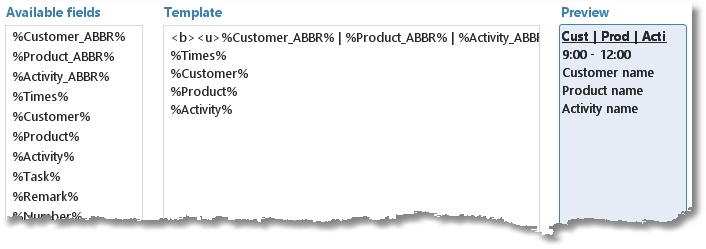
On this tab you can define the content and layout of the time slots as they are being displayed in the week grid. The layout and style of the text in these time slots can be customized by using html code. Any changes made are being displayed in a (live) preview.